Database
The Database activity (mod_data) lets participants build a shared, structured collection of records. The AI generates the whole structure — fields of up to twelve types, list and single-record templates, and one or two sample entries — plus every approval, participation, availability, completion, and rating setting the teacher requests.
AI-generated settings
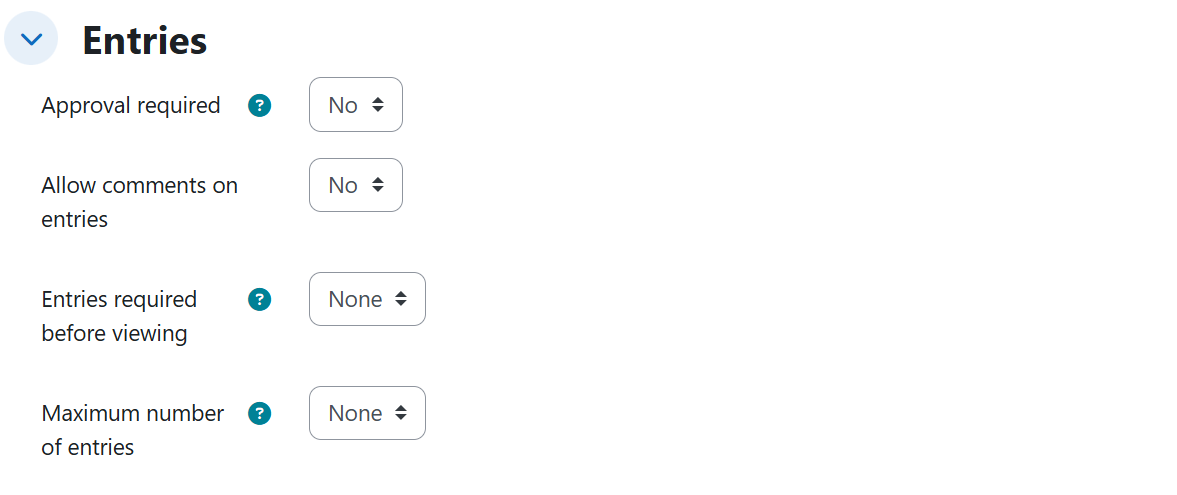
Entries
| Setting | Description | Possible values | Default |
|---|---|---|---|
| Approval required | Entries must be approved by the teacher before others see them. | Yes / No | No |
| Allow editing of approved entries | The author can keep editing an entry after it is approved. | Yes / No | Not emitted |
| Allow comments on entries | Students can comment on other entries. | Yes / No | No |
| Entries required before viewing | How many entries a student must add before seeing other students' entries. | No limit, or a number (e.g. 3) | No limit |
| Maximum number of entries | Cap on entries per student. | No limit, or a number (e.g. 5) | No limit |
Availability
| Setting | Description | Possible values | Default |
|---|---|---|---|
| Available from | Start of the period when entries can be added. A day named as an opening starts at 00:00. | Disabled, or an absolute date / relative period | Disabled |
| Available to | End of the period when entries can be added. A day named as a closing ends at 23:59. | Disabled, or an absolute date / relative period counted from this pair's start | Disabled |
| Read only from | Start of the read-only period (entries visible but not editable). | Disabled, or an absolute date / relative period | Disabled |
| Read only to | End of the read-only period. | Disabled, or an absolute date / relative period counted from this pair's start | Disabled |
Activity completion
| Setting | Description | Possible values | Default |
|---|---|---|---|
| Add entries (completion condition) | The activity counts as completed when the student has added the given number of entries. Emitted together with automatic completion tracking. | Number of required entries (e.g. 2) | Not set |
Ratings
| Setting | Description | Possible values | Default |
|---|---|---|---|
| Aggregate type | How entry ratings consolidate into a grade. | No ratings / Count of ratings / Sum of ratings / Average of ratings / Maximum rating / Minimum rating | No ratings |
| Scale | The rating scale. | Point type with a maximum (e.g. 10, 15, 20) | Point, maximum 100 |
Generated content
Every generated database includes its full structure:
- Title and description.
- 3 to 8 fields appropriate to the topic when the teacher does not list them (each with its name, help description, and required flag), or exactly the fields the teacher describes. Up to twelve field types are supported (verified on the activity's Fields tab):
| Field type (ES form label) | What it stores |
|---|---|
| Short text ("Texto corto") | A one-line text value; can be marked required. |
| Text area ("Área de texto") | A long free-text value. |
| Number ("Número") | A numeric value. |
| Date ("Fecha") | A calendar date. |
| URL ("URL") | A link. |
| Menu ("Lista desplegable") | Single choice from a dropdown, with its option list. |
| Radio button ("Botón de opción (botón de radio)") | Single choice among visible options, with its option list. |
| Multi-select menu ("Lista de selección múltiple") | Several choices at once, with its option list. |
| Checkbox ("Casillas de selección") | Several independent checkboxes, with its option list. |
| Picture ("Imagen") | An image upload. |
| File ("Archivo") | A file upload. |
| Latitude/longitude ("Coordenadas lat/long") | Geographic coordinates. |
- The list template, with the edit, delete, and view-more buttons.
- The single-record template, with the edit, delete, and approve buttons.
- 1 or 2 sample entries — never more than two, so the activity stays collaborative — coherent with the fields: dates in valid ISO format (YYYY-MM-DD), URLs with an http(s) scheme, coordinates as "latitude, longitude", and multi-select values as several comma-separated options taken exactly from the option list.
- When a syllabus or source document is uploaded, the title, description, fields, and sample entries are drawn strictly from it.
Rules and behavior
- The two availability date pairs (when entries can be added, and when they become read-only) are independent of each other; within each pair, a relative closing period is counted from that same pair's resolved start.
- Allow editing of approved entries is only emitted when Approval required is active — Moodle's form hides it otherwise.
- The completion entry count only takes effect with automatic completion tracking, so both are emitted together; it must not be confused with Entries required before viewing.
- A choice field (menu, radio button, multi-select, checkbox) without options is discarded entirely, so requested choice fields always come with their option list loaded.
- Picture and file fields cannot be seeded without uploading a real file, so they are left empty in the sample entries without discarding the entry.
- Every template reference must point to a field that actually exists; if a template does not validate, that part is left empty and Moodle generates its own default template.
- The Scale is only applied when ratings are active; an explicit point score without an aggregate type implies Average of ratings, and an aggregate type without a requested score keeps the default scale (100).
- Ratings create a grade item: the activity appears in the gradebook when an aggregate type is set.
Example prompts
Without syllabus
A minimal prompt that produces a database with 3 to 8 fields, both templates, sample entries, and every setting at its default value:
I need a collaborative database for the Botany course where students record the plant species they identify on the field trips.
A database exercising all twelve field types with sample entries and minimum-rating aggregation:
Prepare a database for the Regional Tourism course where they document destinations around the country. Each entry must have the destination name in a required short text field, a large text area for the review, a numeric field for the altitude in meters, the date of the last visit in a calendar field, the link to the official site, a dropdown list to choose the region among Caribbean, Andean, and Pacific, radio buttons to mark a single accessibility level among high, medium, and low, a multi-select list where they can mark several attraction types among natural, cultural, gastronomic, and adventure, checkboxes for the available services among lodging, transportation, and guide, a photograph of the place, a file with the informational brochure, and the geographic coordinates of the main point. Leave a couple of examples loaded so they can see the format. Entries are rated out of 15 points and each student's final grade is the lowest rating they receive.
With syllabus
Moderation, participation thresholds, completion condition, and sum-of-ratings grading, anchored to unit 2 of the syllabus:
Build a database on unit 2 of the syllabus, where students propose documentary sources for their essay on ethical leadership and its conflicts with data governance. Entries must go through my approval before the others can see them, but once approved the author must be able to keep editing them, and I want them to be able to comment on their classmates'. Each student must contribute 3 entries before being able to see everyone else's, with a maximum of 5 entries per person, and the activity counts as completed for them once they have contributed 2. Entries are rated and the final grade is the sum of the ratings received, out of 20 points.
Exact dates for both availability pairs and count-of-ratings grading, anchored to unit 3 of the syllabus:
I need a database on unit 3 of the document I uploaded, where students record and describe their proposals for disruptive digital products and services, that unit's design topic. Entries can be added from September 1, 2026 until September 30, 2026; starting October 1, 2026 they become read-only and remain visible until November 30, 2026. I want to rate the entries and have each student's grade be the number of ratings they receive.