Feedback
The Feedback activity (mod_feedback) runs custom surveys — course evaluations, habit polls, satisfaction questionnaires — with no grades attached. The AI generates the survey with its title, description, the full set of questions across seven element types, and every anonymity, submission, notification, and availability setting the teacher requests.
AI-generated settings
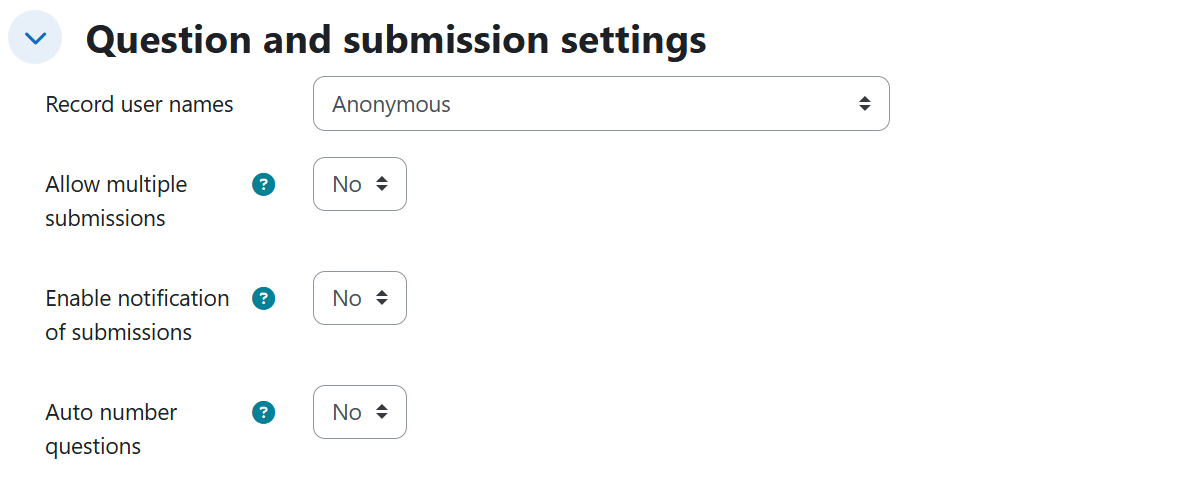
Question and submission settings
| Setting | Description | Possible values | Default |
|---|---|---|---|
| Record user names | Whether responses are anonymous or tied to the respondent. | Anonymous / User's name will be logged and shown with answers | Anonymous |
| Allow multiple submissions | Users can answer the survey more than once. | Yes / No | No |
| Enable notification of submissions | Emails the teacher on every submission. | Yes / No | No |
| Auto number questions | Numbers the questions automatically. | Yes / No | No |
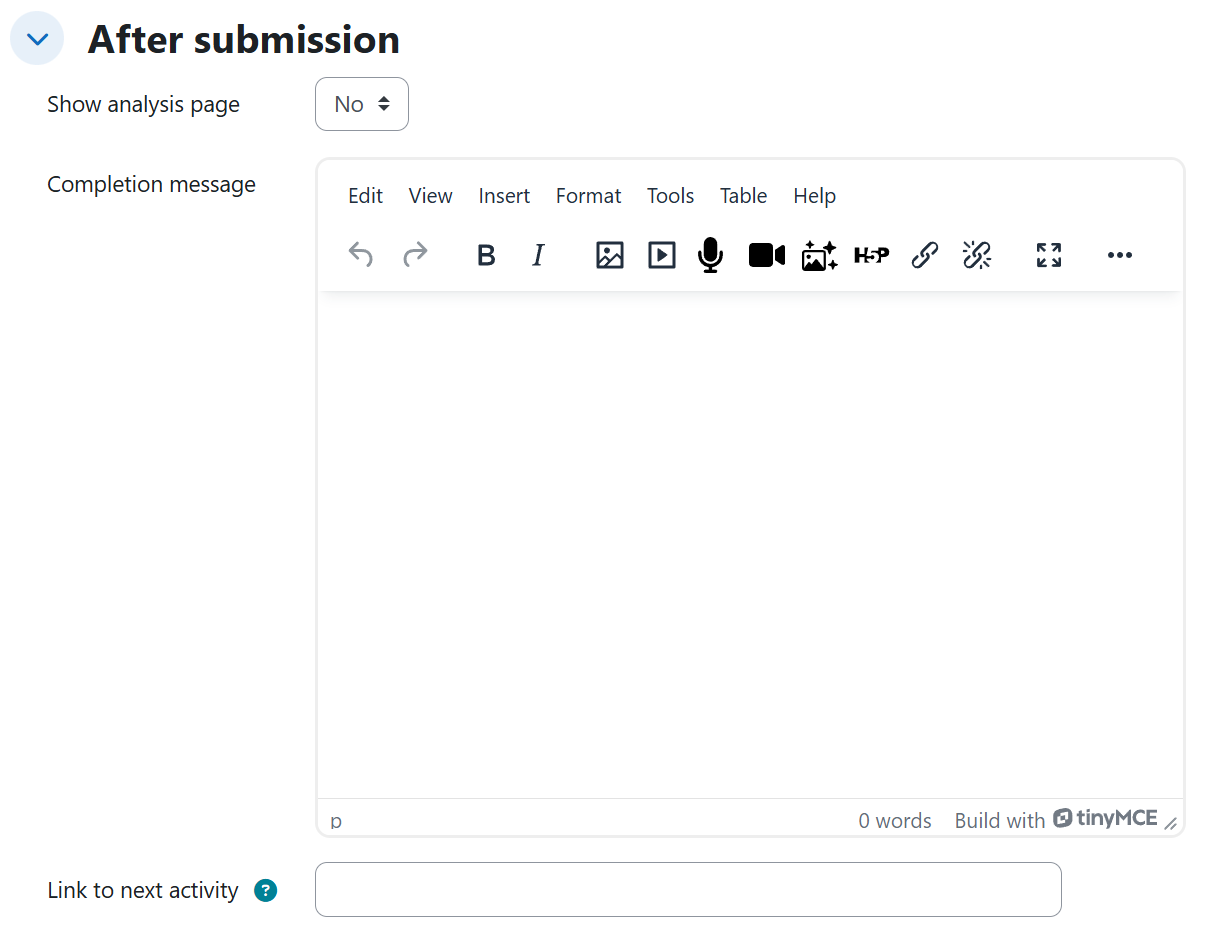
After submission
| Setting | Description | Possible values | Default |
|---|---|---|---|
| Show analysis page | Shows respondents the group's summary of results after submitting. | Yes / No | No |
| Completion message | Closing message shown after submitting. | Empty, or a text written by the AI when the teacher asks for one | Empty |
| Link to next activity | URL the respondent is sent to after finishing. | Empty, or a URL starting with http:// or https:// exactly as the teacher wrote it | Empty |
Availability
| Setting | Description | Possible values | Default |
|---|---|---|---|
| Allow answers from | Start of the response period. A day named as an opening starts at 00:00; an explicit time is respected. | Disabled, or an absolute date / relative period | Disabled |
| Allow answers to | End of the response period. A day named as a closing ends at 23:59. | Disabled, or an absolute date / relative period counted from the resolved opening date (or from creation if none) | Disabled |
Generated content
The AI generates a coherent set of survey elements across seven types (labels as shown in the feedback editor):
| Element type | What the AI generates |
|---|---|
| Multiple choice | A question with its options, in any of its three presentations: single-answer radio buttons, multiple-answer checkboxes, or a single-answer dropdown menu. |
| Multiple choice (rated) | A question where each option carries a numeric value (e.g. Very satisfied = 5, Very unsatisfied = 1) so results can be averaged. |
| Numeric answer | A question answered with a number within a defined range (minimum and maximum, e.g. 0 to 40). |
| Short text answer | A one-line answer, with its width and maximum length defined. |
| Longer text answer | A paragraph answer, with its width and height defined. |
| Text and media area | An explanatory text block interleaved between questions; requires no answer. |
| Information | Automatically records course or respondent data with the responses (which specific datum each one shows is decided by Moodle). |
When a syllabus or source document is uploaded, the title, description, explanatory texts, questions, and their options are drawn strictly from the requested units of that document.
Rules and behavior
- The Completion message is only filled in when the teacher explicitly asks for one.
- The Link to next activity is only saved when the teacher gives an address starting with http:// or https:// — the system never invents a URL — and it is stored exactly as written.
- Which of the three multiple-choice presentations is used follows the teacher's wording: "mark a single answer" produces radio buttons, "mark several options at once" produces checkboxes, and "choose one option from a dropdown" produces the dropdown menu.
- Text and media area elements are interleaved between the questions (e.g. one before each block) and never require an answer.
- Information elements are interleaved in the survey; the concrete datum each one displays is decided by Moodle.
Example prompts
Without syllabus
A minimal prompt that produces an end-of-course survey with every setting at its default value:
I need a survey to close the Research Methodology course, where students rate the clarity of the explanations, the materials, and the teacher's support.
An anonymous survey with the three multiple-choice presentations, a numeric question with a range, auto numbering, the analysis page, and a completion message:
Build an anonymous survey for the Healthy Eating course on the group's eating habits: a question about how many meals they have per day with options to mark a single answer, another about which foods they eat daily where they can mark several options at once, another about their level of physical activity choosing one option from a dropdown, and one about how many hours a week they spend cooking, as a number between 0 and 40. Number the questions automatically, show them the group's summary of results as soon as they finish, and send them off with a message thanking them for their time.
With syllabus
A named survey with repeated submissions, submission notifications, and exact dates, anchored to unit 3 of the syllabus:
I want a survey on unit 3 of the document I uploaded, where each student reports the progress of their digital transformation action plan: the organization they chose, the sector, and the stage of the digital roadmap they are at, in one-line short answers, and where they also tell in a long paragraph how they applied that unit's digital SWOT analysis and what they would change about their strategy. I need to know who answered what, they should be able to answer it several times throughout the semester, and I want an email notification every time someone submits it. Open it on June 2, 2027 and close it on June 16, 2027.
A block-structured survey with rated options, Information elements, a next-activity link, and relative dates, anchored to unit 1 of the syllabus:
Prepare a survey on unit 1 of the syllabus, divided into three blocks, one for each pillar of a successful digital culture covered in that unit: collaboration, innovation, and continuous learning. Before each block put an explanatory text saying what that pillar is about, and in each block questions where each option is worth a score so the result can be averaged, for example Very satisfied is worth 5 and Very unsatisfied is worth 1. Also automatically record the course and participant data along with the responses. When they finish, send them to https://moodle.org/ to continue. It should open tomorrow and be available for two weeks.