General settings
This section allows you to enable or disable the plugin’s visibility in courses and to set the length limit for student comments.
- Go to Administration under the Plugins section.
- Find Local Plugins and locate the Ranking Activities AI links.
- Click on General settings.
- Check or uncheck Enable plugin in courses to control the plugin visibility.
- Adjust Maximum character limit for student comments if needed and save the changes.
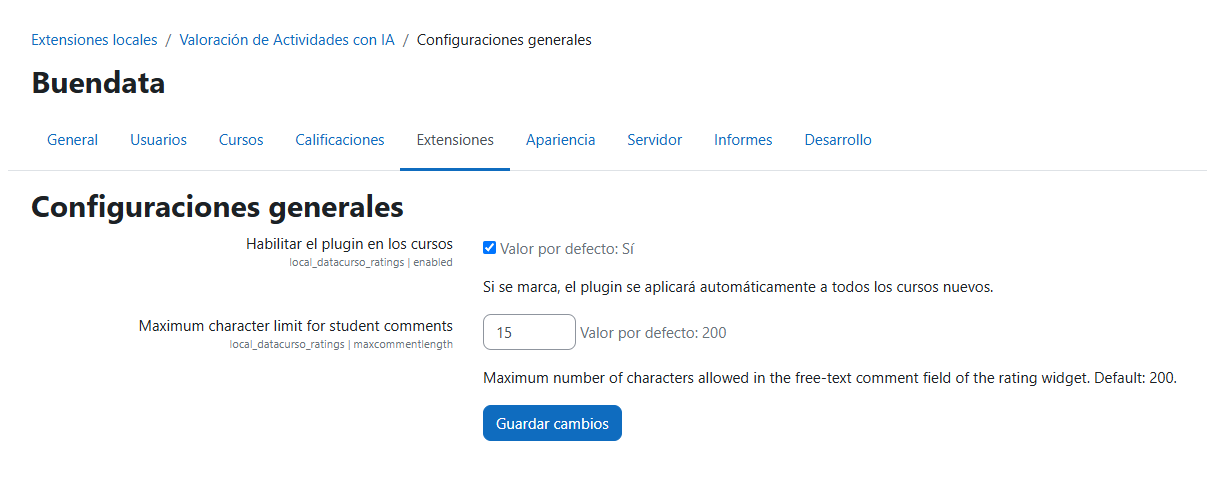
Available settings
| Setting | Name | Type | Default | Description |
|---|---|---|---|---|
| Enable plugin in courses | enabled | Checkbox | Enabled | If checked, the plugin will be automatically applied to all new courses. This is the site-wide switch: when unchecked, the rating buttons are hidden in every course and the per-course option is not shown in the course settings form. Courses without a stored per-course value inherit this setting. |
| Maximum character limit for student comments | maxcommentlength | Integer | 200 | Maximum number of characters allowed in the free-text comment field of the rating widget. It applies only to the "Other" free-text comment; predefined phrases are stored in full regardless of this value (since version 1.0.7). |