Configuration
Once installed, follow these steps to configure the plugin:
- Log in as an administrator.
- Go to any Moodle course and locate the Ranking Activities AI section.
- Ensure the DataCurso AI Provider plugin is active and licensed.
- Students can now start rating activities. Teachers and admins can generate AI-based analyses using the “Generate AI Analysis” button.
General Settings
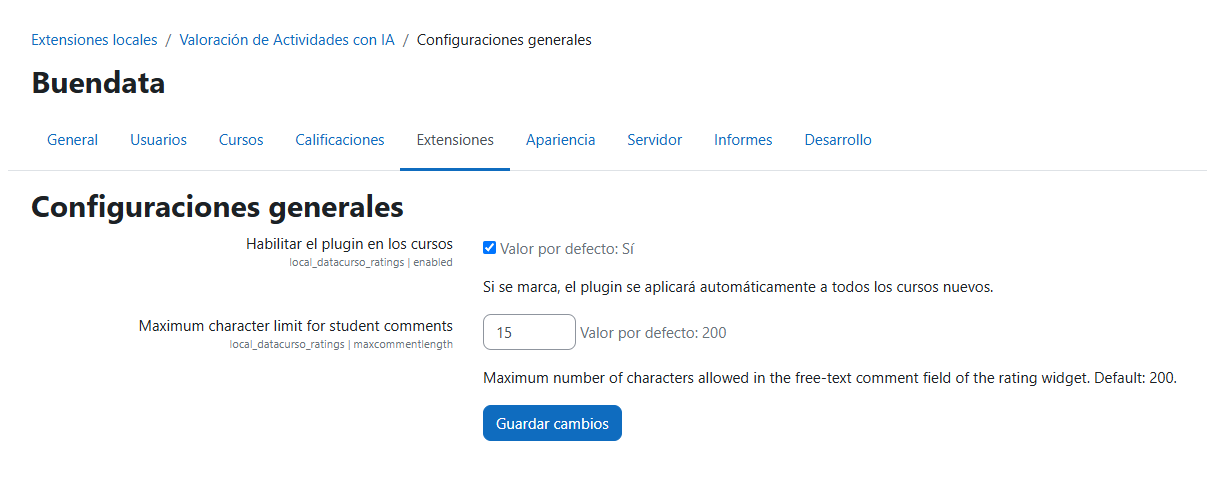
Administrators can configure the plugin through the administration panel:
Site administration > Plugins > Local plugins > Ranking Activities AI > General settings.
The page contains two settings:
- Enable plugin in courses (
enabled) – Checkbox, enabled by default. If checked, the plugin is automatically applied to all new courses. It acts as the site-wide switch and as the default value for the per-course setting; when unchecked, the rating buttons are hidden in every course and the course-level option disappears from the course settings form. - Maximum character limit for student comments (
maxcommentlength) – Integer, default 200. Maximum number of characters allowed in the free-text comment field ("Other") of the rating widget. Longer comments are truncated on save. Predefined phrases are not affected by this limit (since version 1.0.7).