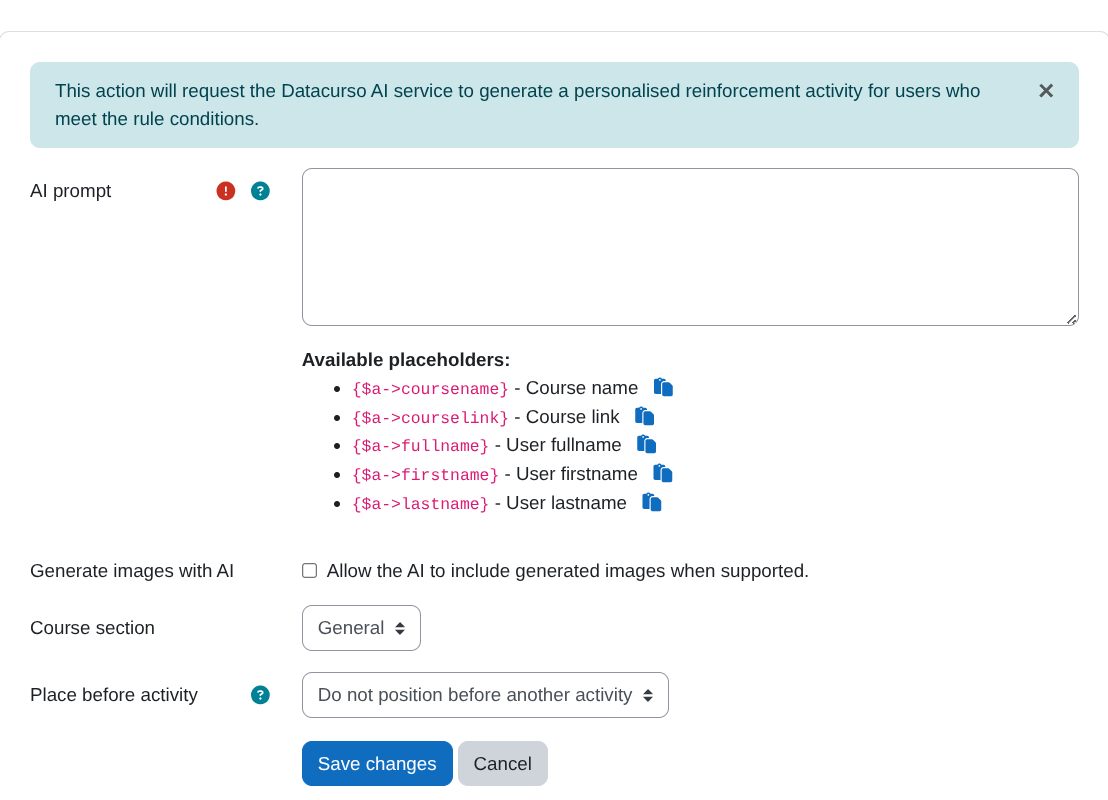
Create AI reinforcement activity (Only for moodle 4.5 or higher)
Description
This action will request the Datacurso AI service to generate a personalised reinforcement activity for users who meet the rule conditions.
💡 In practice: use this when you want to automatically provide extra practice to learners who are inactive or struggling.
Pre-requisites
- Moodle 4.5 or higher
- Have the
Restriction by userplugin installed and enabled, which can be downloaded for free from: https://moodle.org/plugins/availability_user. - Have the
Course Creator AIplugin installed and enabled, which can be downloaded for free from: https://moodle.org/plugins/local_coursegen.
Action configuration
-
Prompt:
Enter the instruction that the AI will use to generate the reinforcement activity.- You can include placeholders to personalise the prompt for each user. Available placeholders:
{$a->coursename}– Course name{$a->courseurl}– Course URL{$a->fullname}– User full name{$a->firstname}– User first name{$a->lastname}– User last name
Tip: A good prompt explains what to reinforce and what the learner should practice.
- You can include placeholders to personalise the prompt for each user. Available placeholders:
-
Generate images:
If enabled, the AI may generate and include images in the created activity when supported by the target activity type. -
Section:
Select the course section where the activity will be created. -
Insert before:
Optionally choose an existing activity to insert the new activity before. If set toNone, the new activity will be appended at the end of the selected section.