Add to LinkedIn (one-click)
This flow lets learners add issued certificate data to LinkedIn with prefilled fields.
- On the certificate page, click Share on LinkedIn.

-
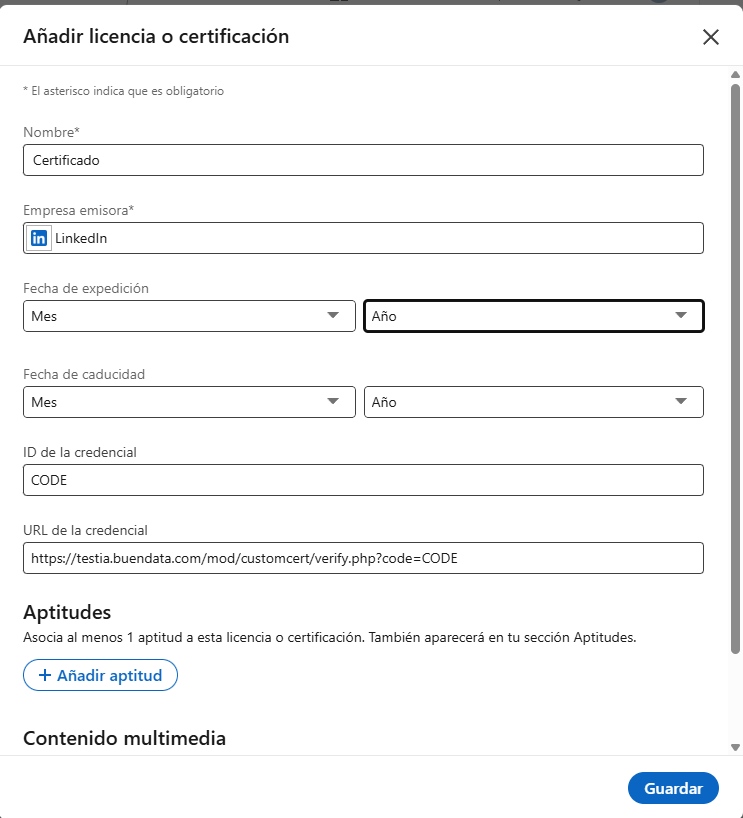
A LinkedIn window opens with prefilled data: title, issuing organization, issue date, credential ID, verification URL and, when the certificate has an expiry element, the expiry date.
-
Review the information and click Save/Add.
If the user is not logged in to LinkedIn, LinkedIn requests sign-in first.
If the browser blocks the new window, allow pop-ups for the site and try again.
If the button does not appear, verify certificate issuance and plugin configuration (organization name and organization ID).
The plugin never publishes on your behalf; it only prefills the official LinkedIn form.